Tutorial · 4 steps · about 8 minutes
Sell an exam on its own
By Gill · builder of Chapters LMS · Updated September 2026
Sometimes the exam is the product: a trade certification, an entrance test, a yearly recertification. Give an exam a price in Chapters and it becomes a normal Shopify product, bought at your normal checkout. The same exam can also sit at the end of a course as its final exam.
What you need
- Your questions, and a decision on the passing score. Everything else has a sensible default.
- Nothing else. A standalone exam does not need a course, a lesson or a video.
Step 1: Create the exam and set the rules
Open Exams in Chapters and press Create exam. Give it a title and a short description, which is what candidates read before they start. Set the passing score, then open Advanced for the rest:
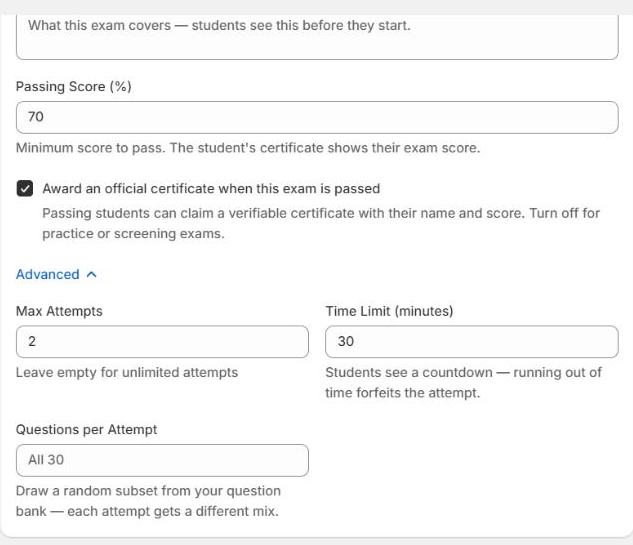
- Passing score — printed on the certificate.
- Max attempts — empty means unlimited. For a standalone exam it counts per purchase, which is what makes paid retakes work.
- Time limit — a countdown that survives a page reload. Submitting late forfeits the attempt, so nobody can stop the clock to go and look something up.
- Questions per attempt — draws a random subset of your bank, so two candidates sitting side by side don't get the same paper.
- Award an official certificate — on by default.
Step 2: Add the questions
Press Add Question and pick a type. Seven are available, all graded automatically: multiple choice, true/false, multiple select, short answer, numeric with a tolerance, ordering and matching. Nothing waits on you to mark it.
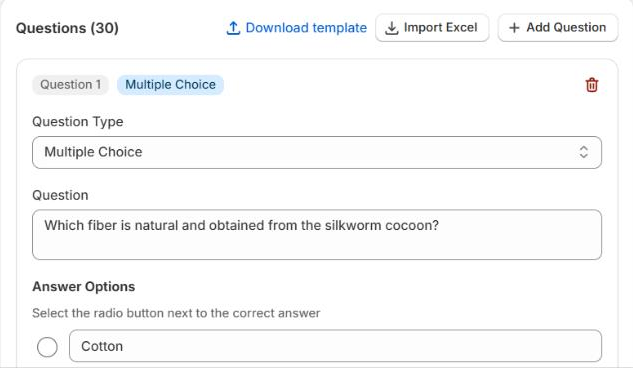
Importing is how you'd move an exam over from another system: one spreadsheet, one upload, done.
Step 3: Give it a price
In Sell this exam, enter a price and save. Chapters creates a Shopify product called Exam — your title, publishes it to your online store and gives it a cover image, so it behaves like any other product you sell. Customers buy it at your normal checkout.
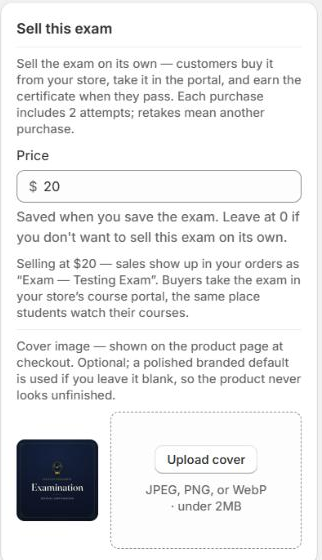
Each purchase grants that buyer a fresh set of attempts. When someone uses them all, they're offered the exam again, so a retake is a purchase rather than a support email. Refund an order and the unused attempts go with it.
Step 4: Or attach it to a course
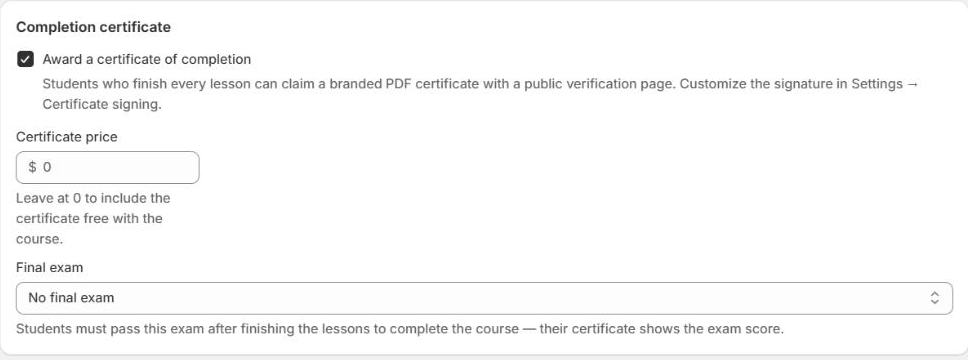
The same exam can be a course's finale. Open a course, go to its Settings step and scroll to the Completion certificate card at the bottom, then pick the exam under Final exam. Students sit it after finishing the lessons, and the pass is what completes the course, so no pass means no certificate.
Watching the results
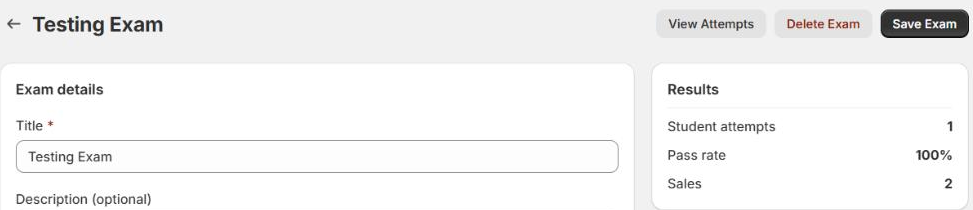
The exam's own page carries the numbers that matter: pass rate, sales, and every student attempt with its score. Insights adds the view across all your exams, including which questions are missed most often. A question everybody gets wrong is usually a badly worded question, not a cohort that didn't study.
If something's not right
Can an exam be free?+
Yes. Leave the price at 0 and the Shopify product stays a draft so nobody can buy it. Attach the exam to a course and enrolled students still sit it as their final exam.
A candidate's connection dropped mid-exam+
The timer is stored on the server, not in their browser, so reloading gets them back into the same sitting with the clock where it should be. It also means closing the tab doesn't buy them extra time.
Can I stop people sharing the answers?+
Set Questions per attempt lower than the size of your bank so each sitting draws a different mix, and keep a time limit on. Grading happens on the server and the answer key never reaches the browser — not before the exam, not after. A candidate who fails sees a score, not a marked paper to pass around before the retake.
Someone failed and wants another go+
For a standalone exam, attempts count per purchase, so they buy the exam again and get a fresh set. You can also raise Max attempts, or clear it for unlimited.
Does the exam show up in my course catalog?+
No. The catalog block lists courses. A standalone exam is a normal product, so it appears in collections, search and your menus like anything else you sell.
Next
Set up the credential the exam hands out: award certificates automatically. Stuck? Email chapters@pixipace.com and I'll look at your store.